Try decorative fonts on your own photo before you buy
Choosing a display font from a specimen is guesswork: lettering looks different on a real photo. In Letterlays Studio you upload your own picture, type your words and try 108 decorative fonts and 54 letter-overlay alphabets on it. You pay only for the one you keep.
How it works
- Upload your photo. Add the picture you are designing for: a poster, an invitation, a product shot or a social post.
- Type your words. Write the actual headline or name and switch between fonts and letter overlays to see each one in place.
- Adjust and export. Change size, colour, spacing and position, then export a PNG, JPG or PDF of your design.
- Buy only what you keep. When a font or overlay pack fits, buy a one-time licence (fonts from $12, letter-overlay packs from $9). No subscription.
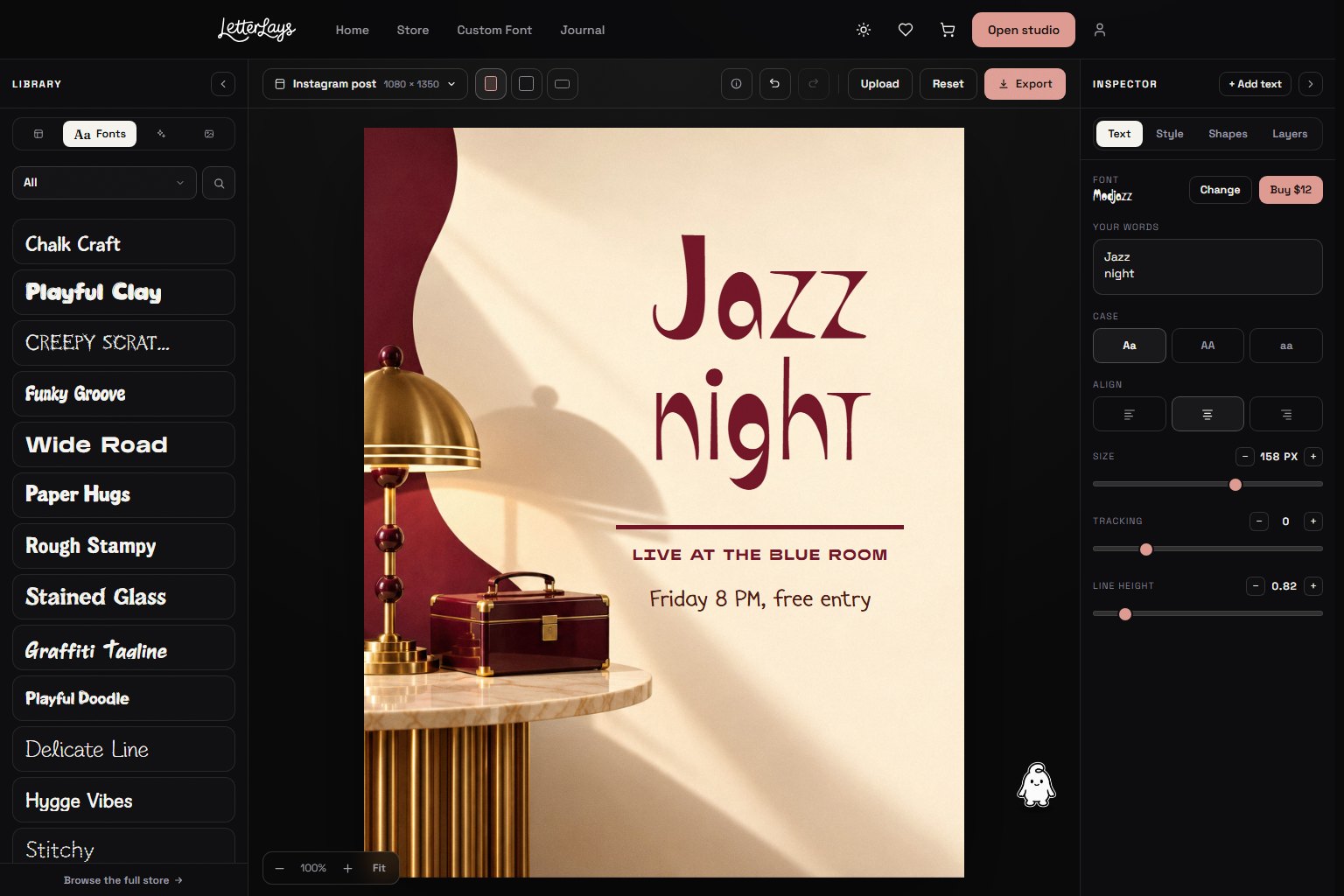
What you can try
Handmade & Craft, Playful & Bubbly, Grunge & Horror, Retro & Groovy and other display font styles, plus photo-real letter overlays such as neon, smoke, frost and glow alphabets, where every letter is a separate image.
Licences
One-time payments with instant download. Fonts: Desktop / Creator, Webfont, E-publishing, Business and App & Game. Letter overlays: Personal, Commercial and Extended. See the licensing guide. A step-by-step example is in How to try fonts on your own photo.
