
Try decorative fonts on your photo free in Letterlays Studio
Upload your image and test 108 fonts and 54 letter-overlay packs in the browser: no account, real PNG, JPG and PDF export.
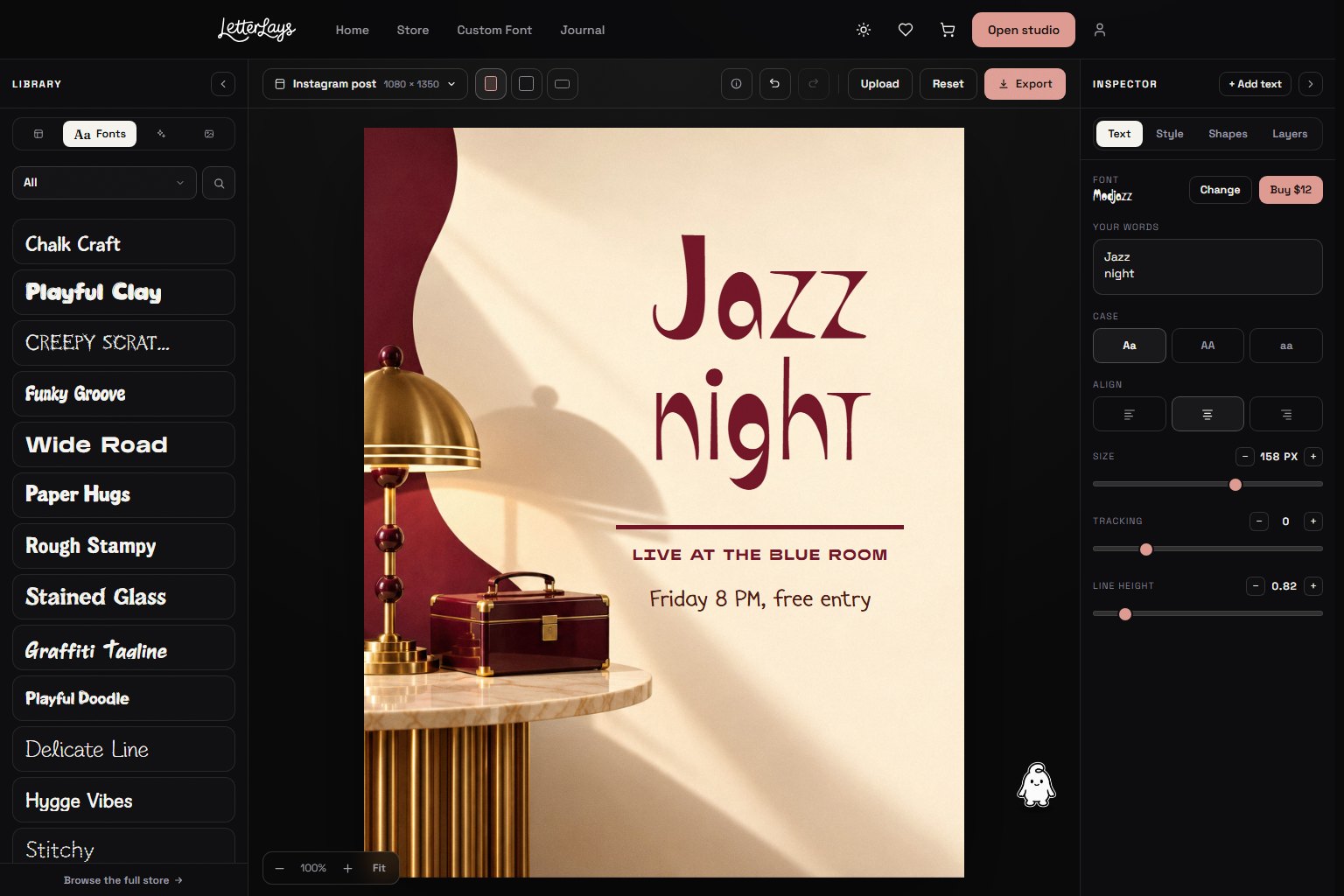
Letterlays Studio is a free browser-based editor where you upload your own photograph and try decorative fonts on it immediately. There is no signup requirement, and you can test all 108 typefaces and 54 letter-overlay packs in the catalog before making any purchase decision.
The workflow is straightforward: visit letterlays.com, click Studio, upload your image (or choose from backgrounds), type your words, and pick a font from the catalog. The composition updates in real time. Adjust size, position, colour and spacing until the lettering feels right for your project. Export the result as PNG, JPG or PDF when you are satisfied.
This tool is useful when you need to see how a display font will actually look with your specific image, not just with generic placeholder copy. You can compare Script & Handwritten faces against Brush & Paint styles, check how a Geometric & Bold headline reads over a photograph, or preview Retro & Groovy lettering on a product mockup — all without leaving the browser tab.
In Studio every typeface shows its complete character set, lowercase included, so you can test your real words. Fonts marked free export clean files for personal use; premium fonts export with a small watermark until you buy the licence. The free demo files you can download (from Letterlays or from font directories) are smaller: capitals A–Z, numbers 0–9 and basic punctuation, for personal tests only.
Letter overlays work differently: they are photorealistic alphabet images (neon signs, watercolour flowers, glitter, smoke) composited as layers rather than typed as fonts. Studio shows every overlay variant; you select letters individually to build words. Every overlay pack is on sale with a one-time licence (Personal $9, Commercial $19, Extended $49), and you can build and preview the whole composition in Studio before you buy.
To upgrade from a demo font to the full licensed version: after testing in Studio, visit the product page for that typeface. Choose the licence that matches your intended use — Desktop / Creator ($12) for most design work, Webfont ($29) if the font will be embedded on a website, App & Game ($99) for mobile or software projects. The font page explains what each licence allows and delivers the complete character set after purchase.
Studio exports are high-resolution rasters ready for print, web or social use. The composition you create belongs to you, within the limits of the font licence you hold. Free demo exports follow the demo's personal-use-only restriction; exports created with a licensed full font follow that commercial licence. Keep the layered project saved if you may need to edit the text later — Studio stores recent drafts locally in your browser.
Start with the photo that matters for your actual project. Generic tests on stock imagery will not show whether the type really works with your brand, product or event. If you are choosing between three typefaces, export all three versions at the size and format you will use, then compare them in context rather than in the browser preview. The right choice usually becomes obvious when you see it at final scale.
Frequently asked questions
Is Letterlays Studio really free?
Yes. There is no charge to use the editor, upload images, test fonts or export. Exports with fonts marked free are clean files for personal use; premium fonts add a small watermark until you buy a licence, which starts at $12.
Do I need an account to use Studio?
No account is required to edit and export. Creating a free account lets you save favourite fonts and access your library across devices, but it is optional.
Can I use Studio exports commercially?
That depends on the font licence. Exports created with free demo fonts are restricted to personal, non-commercial use only. Exports created with a purchased full font follow the rights of that licence (Desktop / Creator, Webfont, Business, etc.).
How many fonts can I try?
All 108 typefaces in the Letterlays catalog, plus 54 letter-overlay packs. Switch between them instantly while your composition stays editable.
What file formats does Studio export?
PNG (with transparency), JPG and PDF. Choose the format that matches your intended use — PNG for designs with transparent backgrounds, JPG for photographs, PDF for print-ready files.