
Free demo vs full font: what's included in each and how to upgrade
Uppercase-only demo for testing vs complete commercial typeface. Character coverage, licence limits and the path from free download to paid full version.
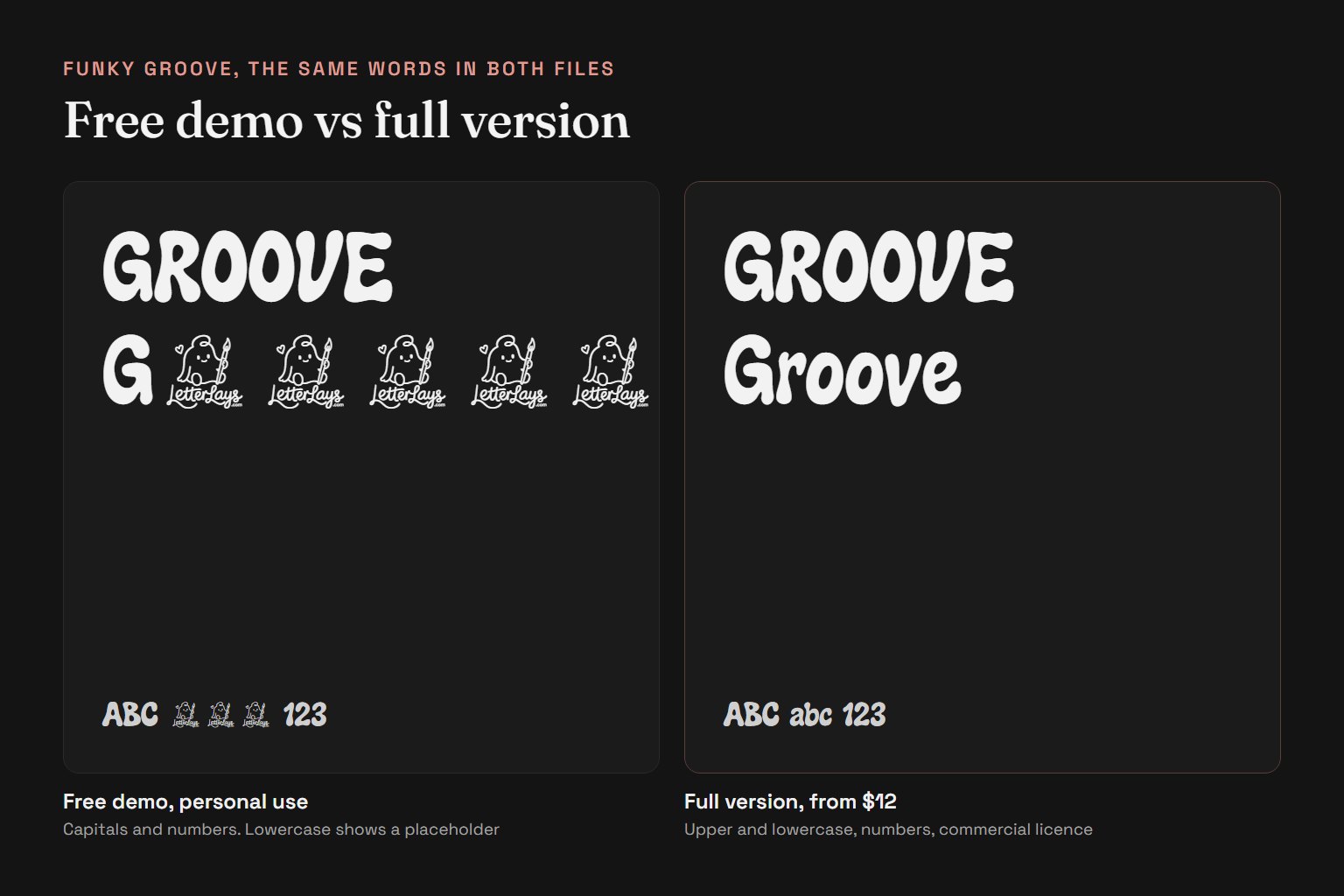
Letterlays free demo fonts are limited-character promotional versions designed for testing a typeface's style before purchasing the full commercial licence. The demo includes uppercase letters A–Z, numbers 0–9 and basic punctuation (period, comma, exclamation, question mark). This is enough to set a headline, try a brand name or preview how the display face reads at large sizes. The demo is restricted to personal, non-commercial use only — no client work, no merchandise, no advertising.
The full font adds lowercase letters a–z, extended punctuation, and the other characters listed on each font page. Check the character set on the product page if you need letters beyond basic Latin, because accent support differs from font to font. More importantly, purchasing the full font grants a commercial licence that permits professional use: logos, branding, packaging, client projects, print-on-demand products, paid advertising and other revenue-generating work. The exact scope depends on which licence tier you choose — Desktop / Creator, Webfont, Business, App & Game, or E-publishing.
Where to download free demos: Letterlays demo fonts are distributed on free font directories including BeFonts, FontSpace and 1001 Fonts. Each demo archive includes a readme file with a direct link to the full version's product page on letterlays.com. If you downloaded a demo elsewhere, visit letterlays.com/fonts, find the typeface by name, or use the /go/ redirect link provided in the demo's documentation.
Upgrade workflow: After testing the demo and deciding the style fits your project, visit the font's product page on Letterlays. You will see the full character set displayed in the gallery, licensing options with clear descriptions, and pricing for each tier. Select the licence that matches your intended use — most designers choose Desktop / Creator ($12) for branding and static graphics, or Webfont ($29) if the font will be embedded on a website. Add to cart, complete checkout via Paddle, and download the full font package immediately.
What the full package includes: The purchased archive contains the complete OpenType font file (.otf), a webfont package (OTF, WOFF, WOFF2) for Webfont licences, and a copy of the End User License Agreement specific to your tier. Installation instructions work across macOS, Windows and Linux. The font installs into your system's font library and becomes available in all design applications — Photoshop, Illustrator, Figma, Canva, Microsoft Office, web browsers (for Webfont), and any other software that accesses system fonts.
Demo restrictions you should know: Modification of the demo font file is prohibited. You cannot add your own glyphs, convert it to another format for redistribution, or bundle it into templates or design kits. Redistribution in any form — sharing the file, including it in a design bundle, or uploading it to another site — is not allowed. These restrictions protect the typeface's integrity and the commercial model that funds continued type design. The full commercial licence removes personal-use restrictions but still prohibits modification, sublicensing and unauthorized redistribution of the font software itself.
No demo-to-full discount: Downloading the free demo does not create a discount on the full version. Demos exist so you can confirm the typeface is right for your project without financial commitment. If you are comparing multiple fonts, download demos of all the candidates, test them in Letterlays Studio with your actual project image and copy, and purchase only the one you will use. The demo does not expire, and you can keep testing it for as long as you need before deciding.
Trying the full font before buying: Letterlays Studio lets you preview the complete character set of every typeface, including lowercase, even if you have not purchased it yet. Upload your image, type your actual project text (not just placeholder copy), choose any font from the catalog, and see the result instantly. This removes the guesswork — you can compare the full character rendering without needing to download and install multiple demo files. Export a Studio composition to confirm the font works at your intended size and format, then purchase the licence if the test succeeds.
Frequently asked questions
Can I use a demo font for client work?
No. Free demo fonts are restricted to personal, non-commercial use only. Any client project, paid work, advertising, merchandise or revenue-generating use requires a purchased commercial licence.
How do I upgrade from demo to full font?
Visit the font's product page on letterlays.com (linked in the demo's readme file), select the appropriate licence tier for your use case, and complete checkout. There is no discount for prior demo downloads — the demo is free to test, and the full price applies when you are ready to purchase.
Can I try the full font before buying?
Yes. Letterlays Studio previews the complete character set of every font in the catalog, including lowercase, even if you have not purchased it. Test the full character rendering with your actual project text before committing.
Do demo fonts expire?
No. Once downloaded, the demo file does not expire. You can keep it and use it for personal testing indefinitely. You are required to purchase a commercial licence before using the font in any professional or revenue-generating work.
Where can I find Letterlays demo fonts?
Letterlays demo fonts are distributed on free font directories including BeFonts, FontSpace and 1001 Fonts. Each demo readme includes a direct link to the full version on letterlays.com.