
Letter overlays for your name: how to make name art that looks real
Spell a name in glowing bokeh, neon light or frost on your own photo, check every letter for free in Studio, and pick the right licence for a gift, a client or a product you sell.
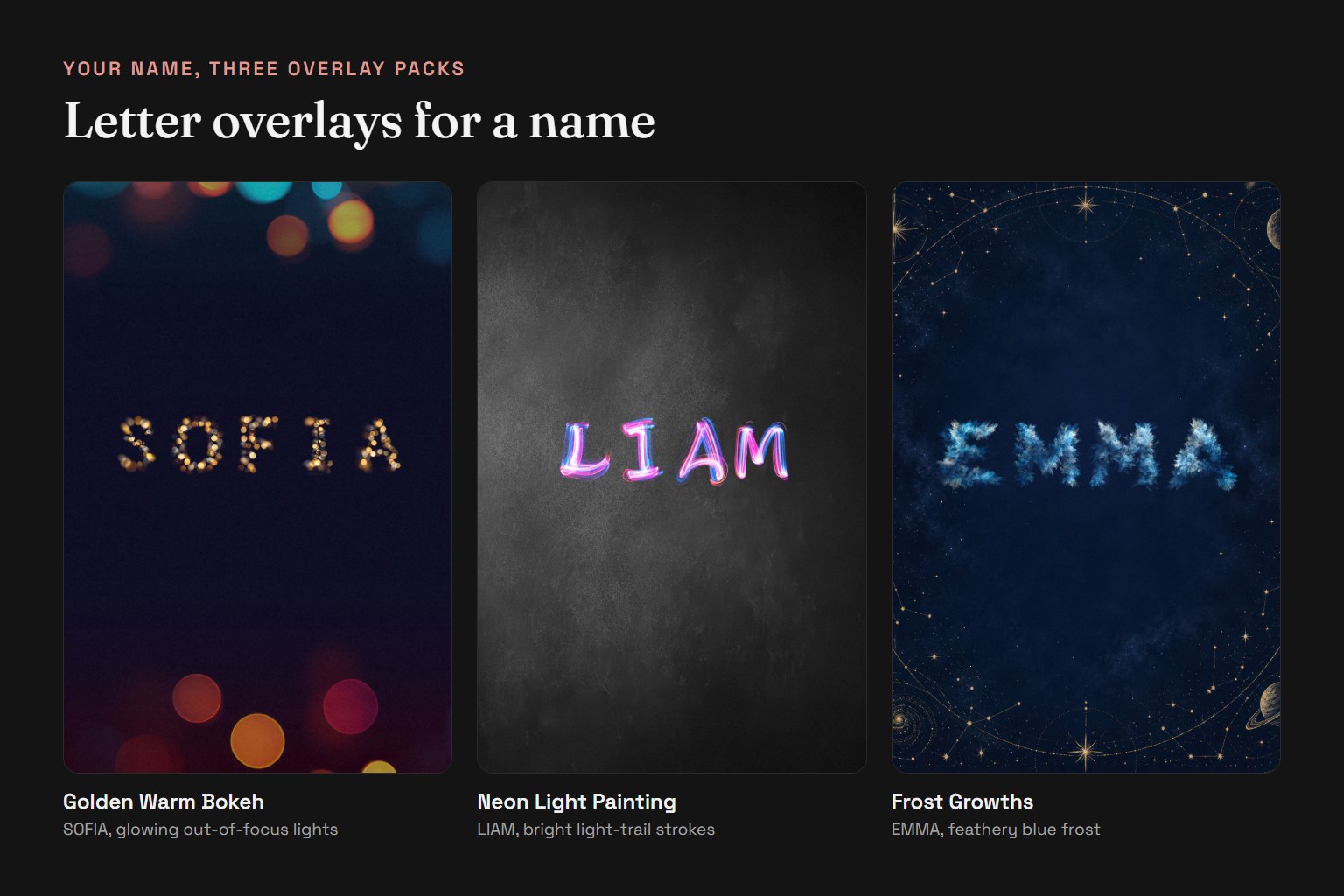
Letter overlays turn a name into a picture: every letter is a photographed texture, such as glowing bokeh lights, neon light painting or ice crystals, instead of a typed font. To make name art, you pick an overlay pack, spell the name letter by letter and blend the letters onto a photo or a dark background. In Letterlays Studio you can do the whole thing in the browser for free and buy the pack only when the result looks right.
Step by step in Studio: open letterlays.com/studio, choose a size (an Instagram post, a story or a print format), upload your photo or pick a background, open the overlay tab and choose a pack. Type the name, then adjust size, spacing and position. Studio places each letter for you and blends it with the Screen mode, so the black around the letter disappears and only the light stays. Export a preview as PNG, JPG or PDF.
Short names work best. Overlays are made for one word in large letters. Names of three to seven letters, initials and monograms read well even on a phone screen. For a long name or a name with a surname, put the first name in overlays and the rest in a plain font underneath, or split it over two lines.
Repeated letters do not look copied. Each Letterlays pack has about three to five variants of every letter. In EMMA the two Ms come from different photographs, and in ANNA the two Ns do too, so the name looks hand-made rather than stamped. Each pack covers A to Z, the numbers 0 to 9 and a few symbols such as & and +, which is enough for names, initials, dates and ages.
Match the pack to the occasion. Golden Warm Bokeh suits birthdays, New Year and weddings; Neon Light Painting suits parties, gaming names and channel art; Frost Growths and Snowflake Crystal suit winter events and Christmas cards. Flower, cloud and glitter packs suit baby announcements and invitations. There are 54 packs in the catalog, and in Studio you can switch packs while keeping the same name and photo.
Photo and colour tips: dark or night photos make light-based letters glow; on a bright photo, lower the background brightness or add a dark area behind the name. Keep the name in the calm part of the image, away from faces. If the letters look too bright, reduce their opacity a little rather than making them smaller.
Which licence you need: for a gift, an invitation for your own party or a personal post, the Personal licence ($9) is enough. If you make name art for clients, for a business's social media or as part of a larger merchandise design, choose Commercial ($19). If you sell products where the name in overlays is the main design, such as name t-shirts, mugs or letter posters, or editable name templates, you need Extended ($49). Each licence is a one-time payment for one pack.
What you get after buying: the full-resolution letter files (JPG, up to 5000 pixels on the long side) for every variant in the pack, available for download in your Letterlays account. You can use them in Photoshop, Affinity Photo, GIMP, Procreate or any editor with a Screen blend mode. Start with the free preview: if the name looks right on your own photo, the purchase is only the last step.
Frequently asked questions
How do I make name art with letter overlays?
Open Letterlays Studio, upload a photo or pick a background, choose an overlay pack and type the name. Studio places and blends each letter for you. Adjust size and spacing, then export. The preview is free.
Can I try a name before I buy the overlay pack?
Yes. Every one of the 54 packs can be tried free in Studio with any name, on your own photo. You buy a licence only when you want the full-resolution letter files and the rights to use them.
Will repeated letters in a name look the same?
No. Each Letterlays pack has about three to five variants of every letter, so double letters such as the two Ms in EMMA come from different photographs.
Which licence do I need to sell name t-shirts or posters?
The Extended licence ($49 per pack). It covers products where the overlay letters are the main design, such as name t-shirts, mugs and letter posters, in unlimited quantities. Gifts and personal posts need only the Personal licence ($9); client work needs Commercial ($19).
Do letter overlays work in Photoshop?
Yes. The letters are JPG files on black. Place them on your design and set the layer blend mode to Screen, and the black background disappears. The same works in Affinity Photo, GIMP and Procreate; in editors without blend modes, compose the name in Letterlays Studio and export it.