
Photorealistic neon, smoke and water alphabets: how letter overlays work in Photoshop, Canva and Studio
Photographed alphabet letters explained: neon light, curling smoke, realistic water and frost. File formats, blend modes in Photoshop and Canva, and commercial licensing.
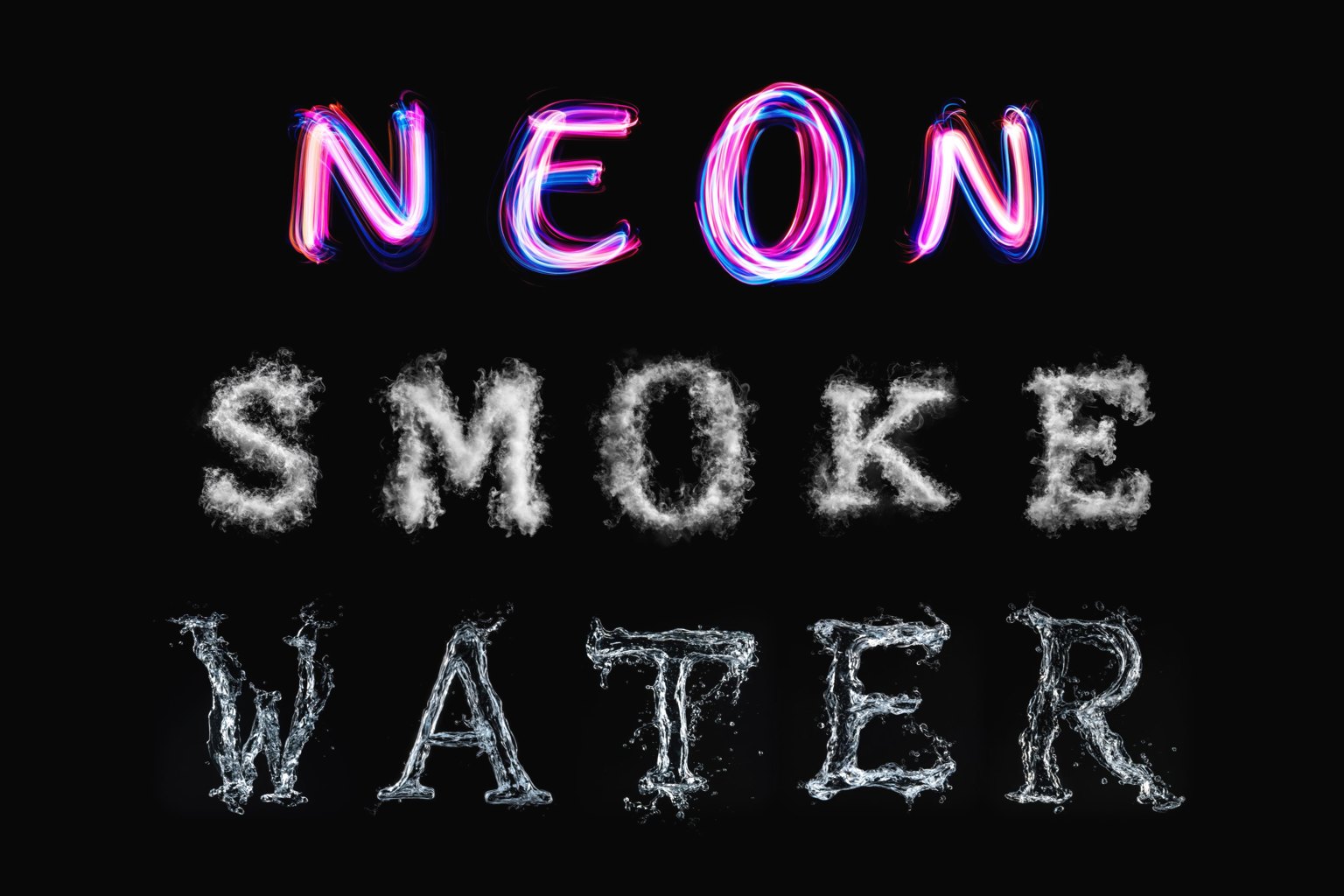
In digital graphic design, vector typography (.otf and .ttf font files) represents the standard for scalable text. Built from mathematical Bézier curves, vector typefaces excel at clean lines, crisp geometry, and infinite resolution scalability. However, modern visual culture frequently demands tactile, photographic realism that mathematical vectors cannot easily replicate. When a poster, album cover, luxury package, or campaign requires glowing neon tubes, curling smoke, water splashes, or crystalline frost, simulated vector effects often feel artificial. Digital drop shadows and bevel filters approximate surface styling, but fail to capture microscopic light scattering, fluid dynamics, and organic material chaos. This is where photorealistic letter overlays provide a specialized creative solution.
A letter overlay is not an installable font file: each character is a photograph or 3D render of physical material shaped into a glyph. The Letterlays catalog features 54 packs: glowing gas, drifting smoke, flowing water, glittering bokeh, ice crystals, botanicals, and metallic textures. You build words by arranging individual photographic letters over background imagery, creating headlines where the material carries the visual narrative.
The Letterlays overlay catalog organizes these natural phenomena into focused material families: - Neon and luminous light: Packs such as Neon Light Painting, Digital Neon, LED Light Painting, Chroma Light, and Warm Light Painting capture authentic electric discharge, glass tube reflections, filament hotspots, and ambient atmospheric glow halos that bleed naturally into dark backgrounds. - Smoke and atmospheric vapor: Packs like Curling Smoke, Graceful Smoke, Wisp Smoke, and Cumulus Clouds provide natural fluid turbulence, density shifts, semi-transparent wisps, and soft, feathery edges that integrate seamlessly into moody poster photography. - Water and fluid dynamics: Packs including Realistic Water, Floating Water, Soap Foam, Liquid Honey, and Liquid Paint feature genuine light refraction, internal caustic highlights, suspended micro-droplets, and viscous surface tension. - Crystals, ice, and organic textures: Packs such as Snowflake Crystal, Frost Growths, Golden Warm Bokeh, and Shattered Glass Texture offer complex internal facets, prismatic color fringing, and tactile surface structures.
Designers frequently ask why Letterlays letter overlays are delivered as high-resolution JPGs on black (up to 5000px) instead of transparent PNGs. The reason is rooted in optical physics and digital blending mechanics. When capturing luminous or refractive phenomena—such as glowing neon light, semi-transparent smoke wisps, or translucent water droplets—light behaves additively. Transparent PNG files rely on alpha transparency channels, which force semi-transparent pixels into a binary cut-out boundary. This often causes harsh fringing, muddy grey edges, and clipped light halos when placed over dark or colored backgrounds. In contrast, delivering letters on pure black enables additive blend modes such as Screen or Linear Dodge (Add). Under the Screen blend mode, pure black mathematically drops to zero opacity, while every delicate gradient of glow, atmospheric haze, and reflection combines naturally with the pixels beneath it.
One of the classic hallmarks of synthetic digital lettering is repetitive character duplication. When a word such as 'BLOOM', 'COFFEE', or 'SUMMER' is set in a textured vector font, repeated letters share the exact same contours, distress marks, and splatter points, immediately signaling a stamped digital effect. Letterlays letter overlay packs solve this problem by providing approximately 3 to 5 unique photographic variants for every letter in the alphabet (A to Z), numerals (0 to 9), and key punctuation symbols like the ampersand (&) and plus sign (+). In a name like 'EMMA', the first 'M' and the second 'M' are drawn from different photographs with unique lighting flares and structural details. This organic variation gives titles, names, and headlines the authentic feel of custom, handcrafted artwork.
Working with letter overlays in Adobe Photoshop provides precise creative control through standard compositing tools: 1. Placing letters: Drag and drop individual JPG files into your layered Photoshop document, positioning each letter along your intended baseline. 2. Applying blend modes: Select letter layers and set their blend mode to 'Screen' (for natural photographic transparency) or 'Linear Dodge (Add)' (for intense light amplification). The solid black background instantly disappears, leaving only textured light and material visible. 3. Layer masking and depth: Add a layer mask to tuck smoke wisps or water splashes behind foreground elements—such as a model's hair, a musician's shoulder, or architectural features—creating realistic depth. 4. Color grading: Clip a Hue/Saturation or Curves adjustment layer directly to the letter layers to tint white neon into electric cyan or hot magenta, or adjust water contrast to harmonize with ambient scene lighting.
Many creators produce graphics using platforms like Canva, Figma, or mobile design apps that do not support advanced Photoshop blend modes or require transparent PNG inputs. Letterlays accommodates this workflow through the free browser Studio at letterlays.com/studio. In Studio, you can select any overlay pack, compose your words over your background, and export a pre-composited high-resolution PNG with clean transparency, or a final high-resolution JPG. You can then import the finished lettering lockup directly into Canva or Figma as a single image layer, positioning it over social templates, marketing flyers, or presentation slides without touching complex desktop software.
For designers who want the fastest path from idea to finished artwork, Letterlays Studio provides a dedicated browser editor. You upload your background photo or select a curated background texture, navigate to the Overlays tab, and select a pack like Curling Smoke or Realistic Water. You simply type your headline, and Studio automatically assigns character variants, handles letter spacing, applies real-time Screen blending, and renders the result instantly on your canvas. You can freely resize, rotate, nudge, and reposition each character until the layout achieves optimal visual balance, then export the completed artwork in print-ready PDF, JPG, or transparent PNG formats.
All 54 letter-overlay packs in the Letterlays catalog are active, fully purchasable, and checkout-ready. Every pack is sold under a transparent, one-time licence with instant archive delivery: - Personal Licence ($9): Permits use in non-commercial personal projects, private gifts, party invitations, personal stationery, and non-monetized social media posts. - Commercial Licence ($19): Covers commercial design work for clients, marketing graphics, social media advertisements, packaging design, and commercial merchandise where the lettering constitutes part of a broader graphic composition. - Extended Licence ($49): Tailored for lettering-led commercial merchandise (such as name t-shirts, monogram prints, or poster products where the overlay letters represent the primary visual product), editable digital templates intended for resale, video/broadcast use, and creative teams of up to 10 users. Every licence is a single, one-time payment with no recurring subscriptions. Once purchased, the complete master archive (containing all high-resolution JPG variants up to 5000px) is immediately available for download in your Letterlays customer library.
Letter overlays are specialized display instruments designed for maximum visual impact. They excel in short headlines, brand names, single-word focal points, monograms, event titles, and dramatic poster headers where the material texture carries the narrative weight of the design. Conversely, they are not intended for body copy, long subheadings, or frequently revised editorial layouts, where manual layer placement becomes inefficient. A proven design formula is the 'Hero and Anchor' pairing: use a photorealistic overlay pack for the single-word headline (such as 'FROST', 'NEON', or 'SPLASH'), and pair it with a clean, sturdy vector display font—such as Wide Road or Botanicum—for dates, locations, prices, and supporting copy.
Comparing letter overlays and vector fonts highlights their complementary strengths:
| Characteristic | Photorealistic Letter Overlays | Vector Fonts (.otf / .ttf) |
|---|---|---|
| File Format | High-resolution JPG image files | Mathematical OpenType / TrueType vector files |
| Editing Workflow | Layer compositing and blend modes | Standard keyboard text input and styling |
| Scalability | Fixed photographic resolution (up to 5000px) | Infinite vector scaling without quality loss |
| Visual Realism | Genuine physical light, fluid, and vapor | Crisp vector contours or simulated surface filters |
| Repeated Characters | 3 to 5 unique photographic variants per glyph | Uniform glyph shape across repeated letters |
| Best Use Cases | High-impact headlines, titles, names, posters | Editorial body text, websites, flexible layouts |
| Letterlays Pricing | $9 Personal, $19 Commercial, $49 Extended | $12 Desktop / Creator, $29 Webfont, $49 Business |
To maximize the visual power of letter overlays, match them carefully to your background photography. Light-based overlays (neon, sparklers, bokeh) require deep, saturated, or nocturnal backgrounds (such as charcoal, midnight blue, or dark street scenes) so their luminous halos can radiate naturally. Smoke and vapor overlays thrive on textured, cinematic imagery where wisps can drift across both dark and mid-tone areas. Water and fluid overlays benefit from clean, uncluttered negative space where refraction highlights and droplet silhouettes can breathe without visual competition. By combining photorealistic overlays with intentional background contrast, you achieve a tactile depth that vector outlines alone cannot deliver.
Frequently asked questions
Are Letterlays letter overlay packs available for purchase right now?
Yes. All 54 letter-overlay packs in the Letterlays catalog are fully available for purchase right now with active checkout. Each pack offers three one-time licensing tiers: Personal ($9), Commercial ($19), and Extended ($49). Purchased files download immediately as high-resolution archives.
Why are letter overlays delivered as JPGs on black rather than transparent PNGs?
Luminous and semi-transparent elements (like glowing neon halos, smoke wisps, and water refractions) rely on additive light physics. Transparent PNG alpha channels clip delicate gradients, creating harsh edges on dark backgrounds. Delivering letters on solid black allows designers to use the Screen blend mode in Photoshop, which makes the black invisible while preserving natural light gradients and realistic edge transparency.
How do letter overlays prevent repeated letters from looking copied?
Each Letterlays pack includes approximately 3 to 5 distinct photographic variants for every letter from A to Z, numbers 0 to 9, and key symbols. In words with repeated letters like 'COFFEE' or 'SUMMER', you use different variants for each instance, ensuring the lettering looks naturally photographed rather than cloned.
Can I use letter overlays in Canva or mobile apps without Photoshop?
Yes. You can use the free Letterlays Studio in your browser (letterlays.com/studio) to arrange your overlay letters over your image, adjust spacing, and export a clean transparent PNG or high-resolution JPG. Import that export directly into Canva, Figma, or mobile apps as a graphic layer.
Which licence tier do I need to sell physical merchandise featuring letter overlays?
If you sell products where the letter overlay is the main design feature (such as name t-shirts, initial mugs, or monogram art prints), or digital templates for resale, you need the Extended licence ($49). If the lettering is part of a broader graphic design for a client project or advertisement, the Commercial licence ($19) is sufficient. Personal gifts and non-monetized posts require only the Personal licence ($9).