
What are letter overlays and how do they differ from fonts?
Photorealistic alphabet images vs vector typefaces — file formats, editing workflows and when to choose textured letters over installable fonts.
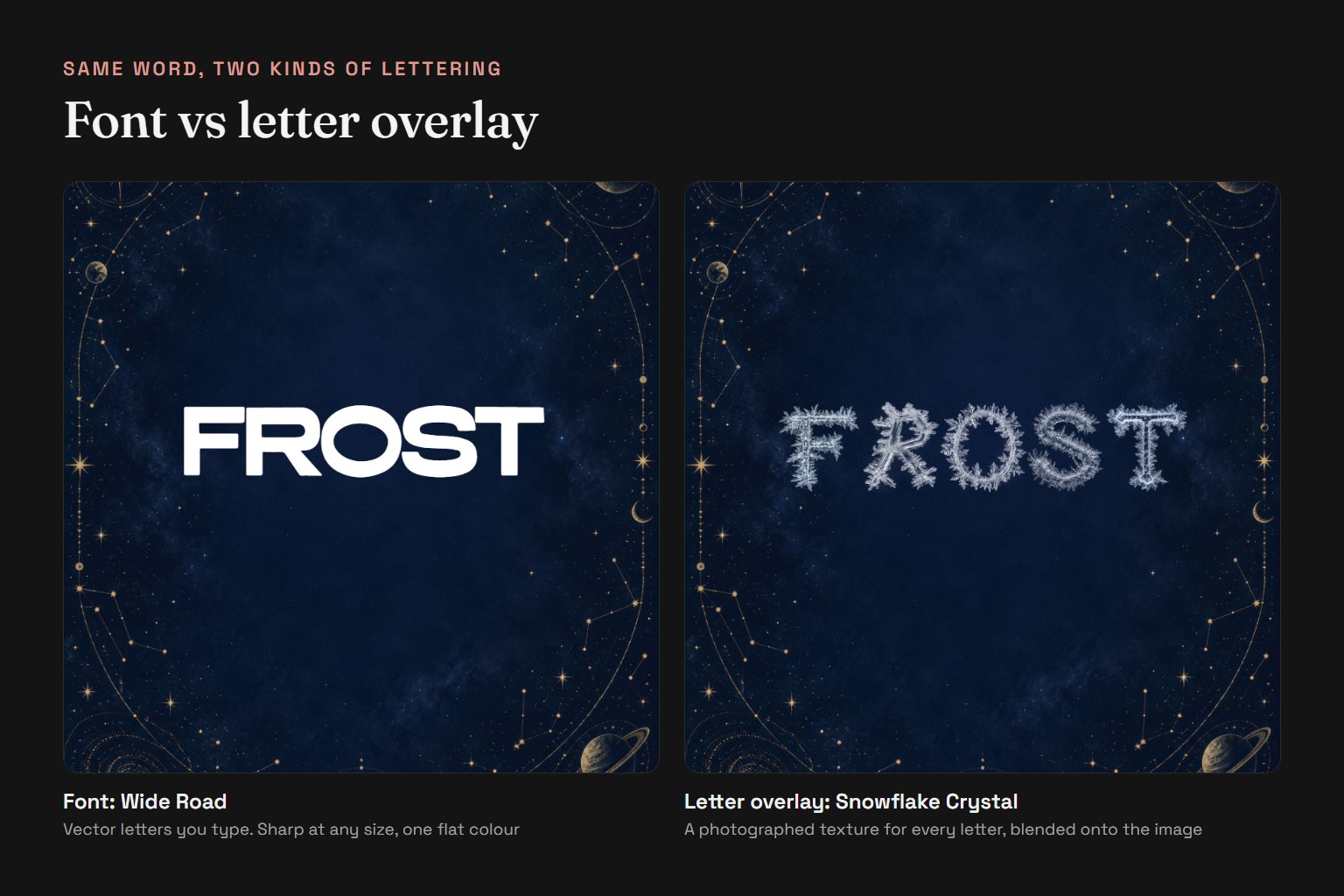
Letter overlays are photorealistic alphabet image files — each letter is a separate high-resolution photograph or rendered texture, not a vector glyph you type. You compose words by placing individual letter images in your design software (Photoshop, Canva, Affinity) or in a browser editor like Letterlays Studio. Fonts, by contrast, are vector outlines installed on your system that render when you type, scalable to any size without quality loss.
File format: Letterlays overlays are delivered as JPG images on a black background, one file per letter variant, up to 5000 pixels on the long side. The black disappears with the Screen blend mode, so only the light of the letter stays on your photo. Fonts are installable software files (.otf, .ttf, .woff2) containing mathematical curves. You cannot 'type' an overlay the way you type a font — you drag and drop pre-rendered letter images. You cannot edit an overlay's shape in a font editor, but you can recolour, warp, mask and composite it as you would any photograph.
Visual range: Letter overlays capture material qualities that vector fonts cannot easily reproduce — real smoke curls, actual neon tube glow, photographed water splashes, physical glitter particles, frost crystal formations. The Letterlays catalog includes 54 overlay packs: aurora lights, liquid honey, shattered glass, watercolor flowers, LED light painting, cumulus clouds, diamond crystals, soap foam, and many more. Each pack covers A to Z, 0 to 9 and a few symbols such as & and +, with about three to five variants of every letter, so repeated characters do not look identical.
Workflow: In Photoshop or similar tools, import the overlay letters as layers. Use Screen, Multiply or Add blend modes to integrate them with the background photograph. Adjust opacity, hue and saturation to match the scene's lighting and atmosphere. Rotate, scale or crop letters to create depth and visual flow. Save the layered file so you can edit text later. In Letterlays Studio, overlay selection is built in — choose a pack, type your words, and the editor handles the layer compositing automatically.
When to choose overlays over fonts: Overlays work best when the texture, material or photographic realism is the main design feature — name art with smoky letters, event invitations with floral textures, product branding with metallic shine, social graphics with neon aesthetics. They are less practical for body text, long passages, or layouts where you will frequently revise the copy, because changing the wording means manually rearranging image layers. Use fonts when you need scalability, editability and broad character coverage. Use overlays when the visual material itself is the message.
Licensing: Overlay licences differ from font licences. Letterlays offers Personal ($9, non-commercial), Commercial ($19, client work and merchandise) and Extended ($49, templates for resale and up to 10 users) tiers for overlay packs. These cover the finished composition rights, not font installation or embedding. You are licensing the use of the provided images in your designs, not ownership of the alphabet files themselves. Full licensing terms are at letterlays.com/overlay-license.
Availability: All 54 Letterlays overlay packs are on sale now, each with a one-time licence: Personal $9, Commercial $19 or Extended $49. The files download right after payment and stay in your Letterlays account. Before buying, you can try every pack free in Studio on your own photo and see exactly how your words will look.
Comparison table:
| Aspect | Letter Overlays | Fonts |
|---|---|---|
| File type | JPG images | .otf/.ttf/.woff2 vector |
| Editing | Layer compositing | Type and format |
| Scaling | Fixed resolution, can pixelate | Infinite, always sharp |
| Texture | Photorealistic materials | Flat vector or outline effects |
| Typing | Manual letter placement | Standard keyboard input |
| Best for | Material-driven headlines | Flexible text, body copy |
| Letterlays price | $9–49 per pack | $0–99 per family by licence |
To try letter overlays now, visit Letterlays Studio, upload your image, select the Overlays tab and build a test composition. You can compare overlay aesthetics against font-based lettering in the same editor session before committing to a creative direction.
Frequently asked questions
Can I buy letter overlays on Letterlays right now?
Yes. All 54 packs are on sale with a one-time licence: Personal $9, Commercial $19 or Extended $49. Files download right after payment and stay in your account. You can try every pack free in Studio first.
Which overlay licence do I need?
Personal ($9) covers gifts, invitations and non-monetised posts. Commercial ($19) covers client work, ads, social graphics and merchandise where the lettering is part of a larger design. Extended ($49) is for products where the letters are the main design, such as name t-shirts or letter posters, templates for resale and teams of up to 10.
Can I edit the shape of a letter overlay?
You cannot edit the underlying letter form the way you edit a vector font. However, you can recolour, warp, mask, apply blend modes and composite overlays like any photographic layer in Photoshop or Canva.
Are letter overlays good for body text?
No. Overlays are best for short headlines, names, titles and decorative words where the texture is the focal point. They are impractical for paragraphs or frequently edited copy. Use fonts for body text and long-form content.
Do I need Photoshop to use letter overlays?
No. Any design tool that supports image layers works — Photoshop, Affinity Photo, GIMP, Canva, Figma, Procreate. Letterlays Studio handles overlay compositing in the browser without requiring separate software.